- Does 2Fin do proactive budgeting, or only track spending after the fact?
- Both, and the budgeting part comes first. In Allocations you set a limit on each category before the period starts — groceries $600, fuel $180 — and that limit is a decision you make in advance, not a summary of what already happened. As transactions land, each category fills against the limit you set. An unallocated meter shows any income you have not assigned to a category or a savings goal yet, so the money waiting for a decision is visible rather than quietly available. Allocations are free on every plan.
- Can I set a budget before I spend anything?
- Yes, and you can start from a blank slate or from your own history. Fin can build a first draft from your last three months, so each category opens with a limit that reflects what you actually spend rather than a number you guessed. Transfers between your own accounts and savings sweeps are left out of that calculation, because averaging them in produces a limit far larger than any real category. From there every limit is a slider you move.
- How do I set up a budget in 2Fin?
- Four steps, one sitting. First pick a cycle — weekly, fortnightly, monthly, quarterly or yearly, starting on the day you choose. Second, let Fin draft the limits from your last three months, or start blank. Third, move each slider to what you intend to spend rather than what you spent last time, and cap a whole group at once where the split does not matter. Fourth, give the rest a job: Fin works out your income from your recurring pay deposits, the unallocated meter shows what is left once your limits are covered, and sending it to a savings goal makes saving the default rather than the leftover. After that the budget maintains itself, because the transactions are already being sorted.
- Is this envelope or zero-based budgeting?
- It takes the useful half of both without the reconciling ritual. Like those methods you assign money to categories in advance, and the unallocated meter asks the zero-based question directly — is every dollar given a job. Money you want to carry forward goes into a savings goal, which holds a real balance across periods with every contribution and withdrawal recorded. Category limits themselves reset each period rather than carrying a leftover, so if a per-category balance rolling forward is the specific mechanic you want, that is the difference worth knowing.
- Does 2Fin work with fortnightly pay?
- Yes. A budget can run weekly, fortnightly, monthly, quarterly or yearly, and you choose which day it starts on. Fortnightly matters in Australia, where a lot of pay lands on that cycle and a monthly budget never quite lines up with it. Categories can run on a different rhythm from the budget itself — a weekly grocery limit inside a fortnightly budget — and Fin reconciles the two so the figures still compare.
- How do I tell mid-period whether I am on track?
- Open Allocations and it is already worked out. Each category carries a progress bar that turns amber at 80 per cent of its limit and red at 100, so a category reads at a glance. A drift strip ranks the few categories running ahead of pace for this point in the period, which is usually one or two rather than a wall of numbers. Alongside that sits your daily burn rate and, once enough of the period has elapsed to mean something, a projected end-of-period total.
- Will Fin show me before I go over budget?
- Yes, the moment you open Allocations. Each category’s bar turns amber at 80 per cent of its limit and red at the limit, and the drift strip lists the few categories running ahead of pace for this point in the period, so the categories that need a decision are the first thing you see. Today that signal lives on the page rather than arriving as a message, which is why the drift strip and the projection are built to make one glance enough.
- How does the end-of-period projection work?
- It takes what you have spent so far in the period, divides by the days elapsed, and extends that pace to the end. The useful part is when it refuses. Under four days elapsed there is no projection at all, because a single early purchase turns a straight-line extrapolation into fiction. Differences smaller than five dollars or five per cent of the limit are treated as noise rather than a trend. A projection you can act on is worth more than one that is always there.
- Can I cap a whole group of categories, not just one?
- Yes. As well as a limit on a single category, you can put one cap across a whole set — a $900 ceiling on everything in Running the car, however it splits between fuel, tolls and servicing. Both kinds live in the same budget, so you can be precise where it matters and loose where it does not.
- How do savings goals work?
- A savings goal holds a balance and a target, and every contribution and withdrawal is recorded, so the number is auditable rather than a running estimate you have to trust. Goals can be ordered by priority, and each one can opt in to auto-funding with an optional cap per period. When you choose Apply auto-funding, income left over once your category limits are covered is shared across those goals in your priority order. It runs when you apply it, not on a schedule, and you see the amount and confirm first.
- What savings goal templates does 2Fin include?
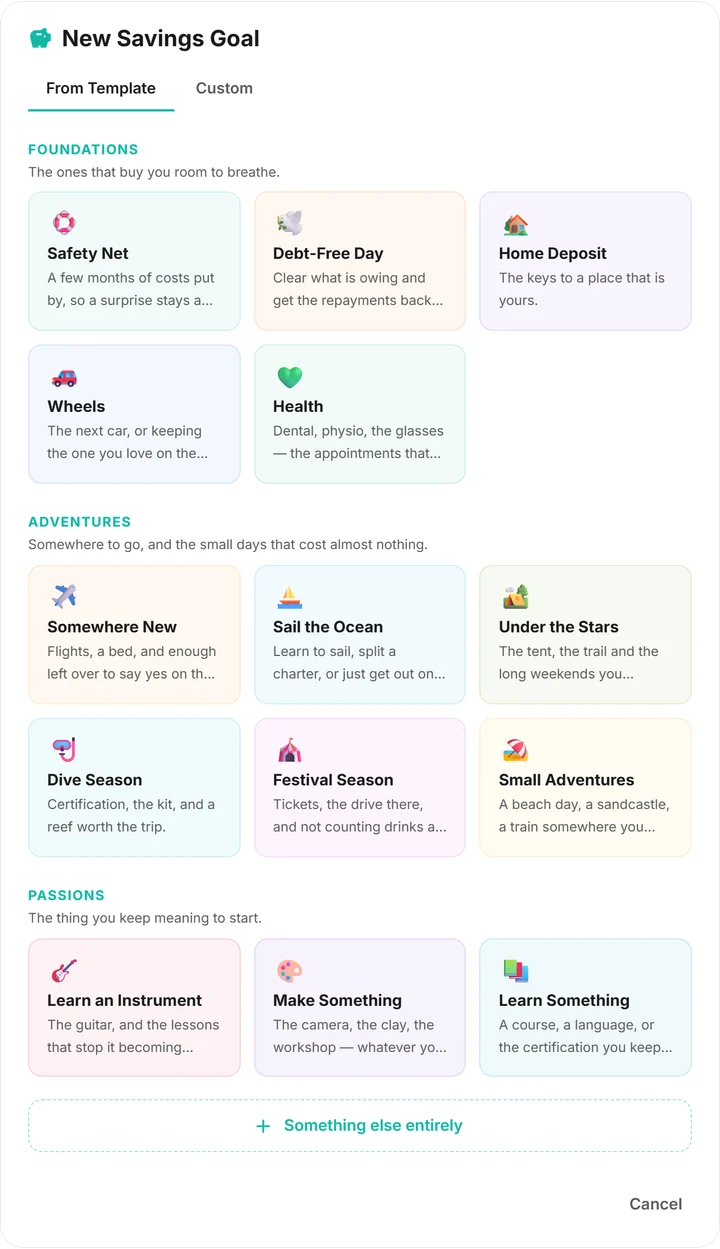
- Fourteen, in three groups. Foundations are the ones that buy you room to breathe: Safety Net, Debt-Free Day, Home Deposit, Wheels and Health. Adventures are somewhere to go, and the small days that cost almost nothing: Somewhere New, Sail the Ocean, Under the Stars, Dive Season, Festival Season and Small Adventures. Passions are the thing you keep meaning to start: Learn an Instrument, Make Something and Learn Something. Picking one fills in a name, a colour and a starting target that you then change to suit you, and "Something else entirely" opens a blank goal instead.
- How does Fin work out my income for the budget?
- Every deposit is tracked either way — the question is only which ones your limits are set against. Fin builds a baseline from the pay that recurs, and averages what has actually arrived when nothing recurs yet. From there you have two controls: a per-stream switch that keeps an income source on the record without counting it towards the baseline, and a manual override where you set the income figure yourself. For lumpy freelance work, budgeting against a floor you chose is more stable than budgeting against whatever last month happened to bring in.
- Does budgeting cost extra on 2Fin?
- No. Budget allocations and savings goals are on the free plan and every plan above it. Setting a limit and comparing it against what you actually spent is arithmetic over data you already own, so it is not something to charge for. Statement uploads and live feeds from your own sheet or bank-feed account are free too; the paid plans add automatic categorisation, receipts, tax analysis and reporting.
- Can I budget business and personal spending separately?
- Yes, using sets. Group your categories into a Business set and a Personal set, then put a limit on each set as a whole — one ceiling across everything in Business, however it splits between tools, subscriptions and travel. Set-level caps and ordinary per-category limits live side by side in the same budget, and switching lens re-cuts the whole page so you see one side of your money at a time. Sets and lenses are on the Elite+ and Auto+ plans; the budgeting itself is free.